Hi All.
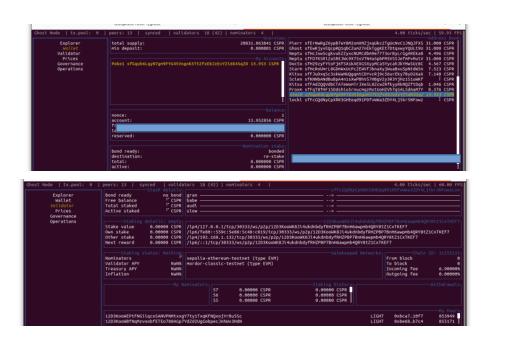
I am working in Ghost Eye and have run into an issue. I am able to bond in a wallet, but when I go to the validator tab it is showing no bonding. Any help would be appreciated.
Hi All.
I am working in Ghost Eye and have run into an issue. I am able to bond in a wallet, but when I go to the validator tab it is showing no bonding. Any help would be appreciated.
The screenshot provided is super small I cant read it. Once the bonding transaction amount finalizes after (entering validator tab ny pressing enter then shift+B, enter amount, return) the amount you bonded should increase the current bonded amount by the additional bond, or show up as the initial bond amount. I am guessing but I do not think you have selected a nominator commission which maybe root cause.
I have been doing some troubleshooting. My node is up and connected, but the keys seem to be the current issue. The info I got was that my keys have not been added to the chain and are local. Not sure if this is true and I will report back.
back in the early days, a new validator needed to submit the 4 keys git hub, I don’t think that is the case any more. perhaps someone will try to help. I apologize for the frustrations
Becoming a validator requires:
I noticed that sometimes changing the order of these 2 steps could help.
Maybe after the Key Generation add a little more to the bond, like 0.001 $CSPR and then wait for 2 eras.
Also, please make sure that the versions match:
Command:
ghost --version
Output:
ghost 0.8.5-4c4374c8125
Command:
ghost-eye --version
Output:
ghost-eye 0.3.92-v0.2.6-120-g47450a5 (2026-05-12)
Rebuilt node and rotated keys. See you in 48 hours!
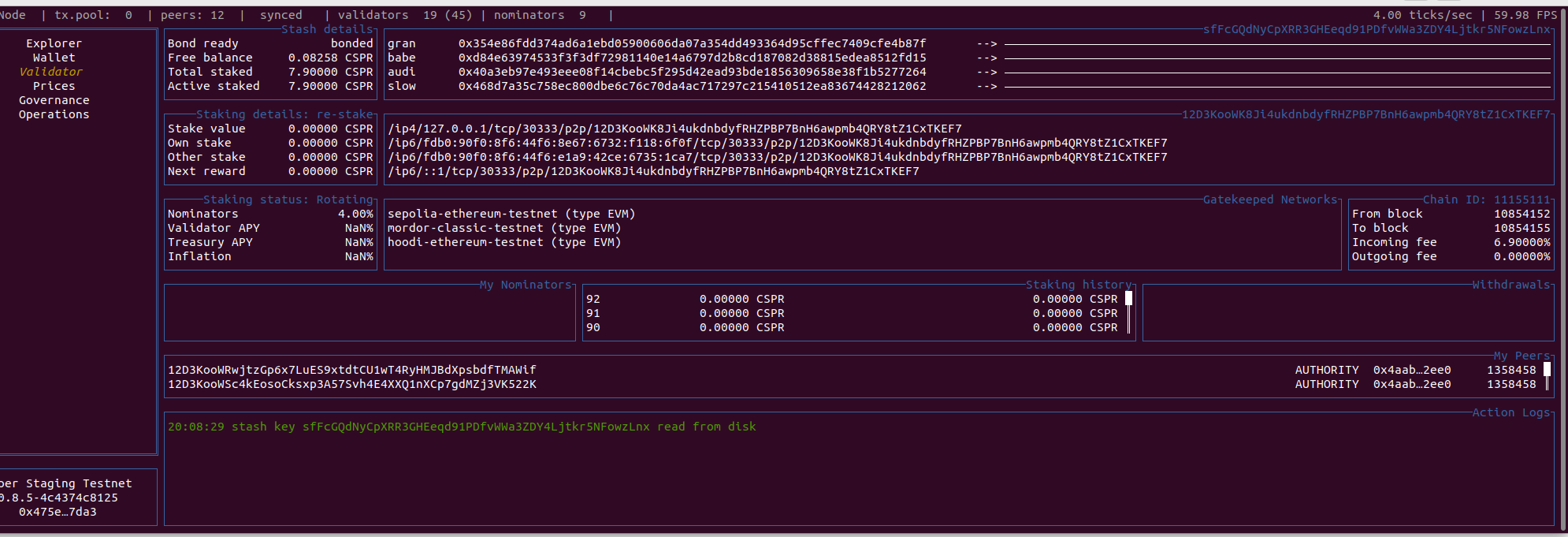
Also, just realized something. You have 7.9 $CSPR staked. If you go to the wallet tab of GHOST Eye and press Shift + N, there will be a list of the current validators. If you look at their minimum stake you’ll see that the lowest stake is at 13 $CSPR. This means that while the protocol requires 6.9 $CSPR to start validating, the competition between nodes increased the minimum to 13 $CSPR.
Now, you can still be chosen to validate but with 7.9 $CSPR your chances are much lower than for the validators with 40 $CSPR.
In order to gurantee your validator status for each era you must stake more $CSPR than the current validator with the LEAST stake.
Let me know if this helps!
I will try that next. Here is where I am at:
GHOST Validator Rebuild Guide: Clean Rebuild from Scratch to Active Validator (TN6 / CASPER)
Posted by: Community Validator
Network: CASPER Staging Testnet (TN6)
Node version: ghost 0.8.5-4c4374c8125
OS: Ubuntu 22.04.5 LTS
Date: May 2026
This post documents a complete validator rebuild from scratch — wiped node, fresh clone, fresh compile, session key rotation, commission set, and validate transaction. It took several sessions to get fully right. Sharing the full process and lessons learned so the community doesn’t have to go through the same trial and error.
Ubuntu 22.04.5 LTS
Rust 1.95.0 stable + nightly (via rustup)
Build dependencies: git, curl, build-essential, pkg-config, libssl-dev, clang, llvm, libudev-dev, protobuf-compiler
wasm targets: wasm32-unknown-unknown for both stable and nightly toolchains
At least 8 CSPR bonded
~40GB free disk space for chain data
Note: The official hardware spec calls for higher disk throughput than typical consumer SSDs. The node will still run but you will see a non-critical warning:
⚠️ The hardware does not meet the minimal requirements
Failed checks: Copy, Seq Write, Rnd Write for role 'Authority'
This does not prevent the node from operating as a validator.
sudo apt update && sudo apt install -y git curl build-essential pkg-config libssl-dev clang llvm libudev-dev protobuf-compiler
Verify Rust is installed:
rustc --version && cargo --version
If not installed, install via rustup:
curl --proto '=https' --tlsv1.2 -sSf https://sh.rustup.rs | sh
Update Rust and add wasm targets:
rustup update && rustup update nightly
rustup target add wasm32-unknown-unknown --toolchain nightly
rustup target add wasm32-unknown-unknown --toolchain stable-x86_64-unknown-linux-gnu
git clone https://git.ghostchain.io/ghostchain/ghost-node ~/ghost-node
cd ~/ghost-node
./scripts/starter.sh --release
When prompted: 'cargo build --release' is what you want? [y/N] — type y.
Build time: approximately 35-40 minutes on typical hardware. The script will:
Clean cargo cache
Apply patches (patch-1 through patch-3)
Fetch all dependencies (~963 crates)
Compile the full release binary
Verify the binary:
ghost --version
# Expected: ghost 0.8.5-4c4374c8125
Your casper.json should already be at /etc/ghost/casper.json. Verify its checksum:
sha256sum /etc/ghost/casper.json
# Expected: 09a5b8de87e2ace61dc521c778b64dff59548ed2b191476218bc379e98978e1f
If you need a fresh copy, download from the official source.
~/ghost-node/target/release/ghost key generate-node-key --bin --file=/etc/ghost/node-key
This outputs your new Peer ID — save it. You’ll need it for the bootnode and telemetry.
Run the setup script:
cd ~/ghost-node && ./scripts/starter.sh --unit-file --set-arguments
When prompted:
p2p port: 30333 (default)
RPC port: 9945 (default)
Chain spec: /etc/ghost/casper.json (default)
Node key: /etc/ghost/node-key (default)
Node name: your choice
Disable validator mode: N
Enable prometheus: Y ← important, don’t miss this
Bootnode: /dns/bootnode69.chain.ghostchain.io/tcp/30334/p2p/12D3KooWF9SWxz9dmy6vfndQhoxqCa7PESaoFWEiF8Jkqh4xKDRf
Known issue: If you accidentally select --no-prometheus, fix it manually:
sudo nano /etc/default/ghost
Replace --no-prometheus with --prometheus-port=9615 --prometheus-external.
Start and enable the service:
sudo systemctl start ghost-node
sudo systemctl enable ghost-node
sudo systemctl status ghost-node
Wait for the node to sync. Check sync state:
curl -s -H "Content-Type: application/json" \
  -d '{"id":1,"jsonrpc":"2.0","method":"system_syncState","params":[]}' \
  http://localhost:9945 | python3 -m json.tool
You are ready to proceed when currentBlock equals highestBlock.
This is where most rebuilds go wrong. Read carefully.
Use GHOST Eye (Shift+R on Validator tab) to rotate keys. This generates new keys, writes them to the keystore, and submits them on-chain in one step.
Do NOT use author_rotateKeys or GHOST Eye’s Shift+R if you want to restore your original keys. rotateKeys always generates new keys regardless of what is in the keystore.
To restore original keys, use author_insertKey for each key type:
curl -s -H "Content-Type: application/json" -d '{
  "id":1,
  "jsonrpc":"2.0",
  "method":"author_insertKey",
  "params":["gran","YOUR_SECRET_SEED","YOUR_GRAN_PUBLIC_KEY_HEX"]
}' http://localhost:9945

# Repeat for: babe, audi, slow
Expected response for each: {"jsonrpc":"2.0","result":null,"id":1}
Important: If you accumulated extra keys from previous rotations, clean the keystore before inserting:
sudo systemctl stop ghost-node
sudo bash -c 'rm /var/lib/ghost/chains/casper_staging_testnet/keystore/*'
sudo systemctl start ghost-node
# Then re-insert all 4 keys via author_insertKey
/var/lib/ghost/chains/casper_staging_testnet/keystore/
Note: the chain directory is casper_staging_testnet, not casper.
journalctl -u ghost-node --since "1 minute ago" | grep -i "role\|babe\|authority"
Expected:
👤 Role: AUTHORITY
👶 Starting BABE Authorship worker
You need free CSPR in your stash account to pay the transaction fee. If your stash has 0 free balance (all bonded), send a small amount (0.1-0.3 CSPR) from another wallet first.
In GHOST Eye, navigate to the Validator tab and use Shift+R to submit the session keys on-chain. Wait for the Action Logs to confirm finalization:
set keys transaction 0x... sent
transaction 0x... has been finalized in block header 0x...
This step is required for validator activation. Without it, your validator will stay in Rotating status indefinitely.
In GHOST Eye on the Validator tab, press Shift+V to open the Commission input. Enter a value (e.g. 5 for 5%). Confirm and wait for the validate transaction to finalize in Action Logs.
cd ~/ghost-node && ./scripts/starter.sh --validate
When prompted, confirm y for validator mode and y to restart the service.
Or manually:
sudo systemctl restart ghost-node
Allow up to 48 hours for full validator activation:
Era 1 (~24 hours): Network accepts new session keys
Era 2 (~48 hours): Validator becomes active, rewards start
Signs of success in GHOST Eye Validator tab:
Own stake shows your bonded CSPR amount
Staking status changes from Rotating
Validator APY shows a percentage
Next reward shows a non-zero value
set keys transaction fails with ServerError(1010) Invalid TransactionCause: Stash account has 0 free balance (all funds bonded).
Fix: Send 0.1-0.3 CSPR to the stash address from another wallet.
--> in GHOST Eye are blankCause: On-chain keys don’t match keystore keys, OR the next-session keys haven’t been picked up yet.
Fix: Ensure keystore has exactly the 4 keys that match on-chain. Clean keystore and re-insert if needed.
Shift+R shows all zeros in the popupCause: GHOST Eye is calling author_rotateKeys which generates new keys. This is by design.
Fix: Use author_insertKey via RPC to restore specific keys, then use Shift+R only when you want to generate and submit new keys together.
Rotating indefinitelyCause: Commission not set / validate transaction not submitted.
Fix: Use Shift+V in GHOST Eye to set commission and submit the validate extrinsic.
❌ Error while dialing /dns/telemetry.ghostchain.io/tcp/443/...status code = 403
Cause: Telemetry server intermittently rejects connections.
Fix: Non-critical. Node operates normally. Check telemetry visibility periodically.
author_rotateKeys always generates new keysCause: This is expected behavior — rotateKeys generates fresh keys every call.
Fix: For existing validators, use author_insertKey instead to restore known keys.
| File | Path | Description |
|---|---|---|
| Chain spec | /etc/ghost/casper.json |
CASPER TN6 genesis |
| Node key | /etc/ghost/node-key |
P2P identity key |
| Session key | /etc/ghost/session-key |
Last submitted session key |
| Stash key | /etc/ghost/stash-key |
Stash account private key |
| Service config | /etc/default/ghost |
CLI arguments |
| Keystore | /var/lib/ghost/chains/casper_staging_testnet/keystore/ |
Validator signing keys |
| Chain data | /var/lib/ghost/chains/casper_staging_testnet/ |
Blockchain data |
| Binary | /usr/bin/ghost |
Node binary |
# Check node health
curl -s -H "Content-Type: application/json" \
  -d '{"id":1,"jsonrpc":"2.0","method":"system_health","params":[]}' \
  http://localhost:9945 | python3 -m json.tool

# Check sync state
curl -s -H "Content-Type: application/json" \
  -d '{"id":1,"jsonrpc":"2.0","method":"system_syncState","params":[]}' \
  http://localhost:9945 | python3 -m json.tool

# Check current block number
curl -s -H "Content-Type: application/json" \
  -d '{"id":1,"jsonrpc":"2.0","method":"chain_getHeader","params":[]}' \
  http://localhost:9945 | python3 -c "import sys,json; d=json.load(sys.stdin); print(int(d['result']['number'],16))"

# View live logs
journalctl -f -u ghost-node --no-pager

# Check keystore contents
sudo ls /var/lib/ghost/chains/casper_staging_testnet/keystore/

# Rotate session keys (generates new keys)
curl -s -H "Content-Type: application/json" \
  -d '{"id":1,"jsonrpc":"2.0","method":"author_rotateKeys","params":[]}' \
  http://localhost:9945

# Insert specific key into keystore
curl -s -H "Content-Type: application/json" -d '{
  "id":1,
  "jsonrpc":"2.0",
  "method":"author_insertKey",
  "params":["KEY_TYPE","SECRET_SEED","PUBLIC_KEY_HEX"]
}' http://localhost:9945
# KEY_TYPE options: gran, babe, audi, slow
| Key | Action |
|---|---|
Shift+R |
Rotate session keys (generates new + submits on-chain) |
Shift+V |
Set commission + submit validate extrinsic |
Shift+C |
Chill stash (stops validation — use with caution) |
Shift+P |
RPC configuration |
Back up your original session key seeds. If you ever need to rebuild, you’ll want them. author_rotateKeys cannot restore them — only author_insertKey can.
The validate transaction (Shift+V) is not optional. It is separate from the session key rotation and must be submitted for the validator to become active.
Free balance in stash is required for any on-chain transactions. Keep at least 0.1-0.5 CSPR free at all times.
The keystore accumulates old keys over multiple rotations. Clean it periodically to avoid confusion.
19 active validators out of 43 as of TN6 — if your stake is near the minimum you may rotate in and out of the active set.
This guide is based on a real rebuild session. All steps were verified on a live TN6 node. If anything has changed since this was written, always defer to the official docs at docs.ghostchain.io and blog.ghostchain.io.
I tripled my bond amount. Let’s see if that helps.
Success! TYSM! This worked.
After thinking about the process, it came down to one of two things:
One of these two things unblocked my node.